Integration
Architecture overview
To access the XpressID service, Veridas will provide you with the following credentials:
- XpressID_URL: Base URL used by the native SDK when calling
XpressID.start. - XpressID_API_URL: Authentication API base URL used by your backend to obtain access tokens and configure the onboarding flow.
- API_KEY: Unique identifier for your client account. This key must remain exclusively in your backend.
Veridas will provide the appropriate URLs and credentials for your environment and region.
| Url name | Environment | Region | Url value |
|---|---|---|---|
| XpressID_URL | Sandbox AWS | EMEA | https://xpressid-web-work.eu.veri-das.com/ |
| AMERS | https://xpressid-web-work.us.veri-das.com/ | ||
| Sandbox GCP | EMEA | https://xpressid-web-work.eu8.veri-das.com/ | |
| Production AWS | EMEA | https://xpressid-web.eu.veri-das.com/ | |
| AMERS | https://xpressid-web.us.veri-das.com/ | ||
| Production GCP | EMEA | https://xpressid-web.eu8.veri-das.com/ | |
| XpressID_API_URL | Sandbox AWS | EMEA | https://api-work.eu.veri-das.com/xpressid/api/v3/ |
| AMERS | https://api-work.us.veri-das.com/xpressid/api/v3/ | ||
| Sandbox GCP | EMEA | https://api-work.eu8.veri-das.com/xpressid/api/v3/ | |
| Production AWS | EMEA | https://api.eu.veri-das.com/xpressid/api/v3/ | |
| AMERS | https://api.us.veri-das.com/xpressid/api/v3/ | ||
| Production GCP | EMEA | https://api.eu8.veri-das.com/xpressid/api/v3/ |
To ensure compliance with Veridas' security protocols, clients must provide information regarding the server IPs where XpressID integration is planned. This requirement applies only to production environments.
Achieving a functional integration of the XpressID service within your infrastructure requires two coordinated parts.
Authentication API
Access tokens must always be requested from your backend. That request is also the place where you send the onboarding configuration JSON for the flow you want to run.
The API_KEY is especially sensitive and must never be embedded in the app. Recommended backend safeguards include:
- user authentication before requesting a token
- abuse prevention such as captcha or rate limiting
- DDoS mitigation
- token issuance controls and auditability
You can review the token request shape in the API documentation here.
Native SDK
The Android SDK is integrated as a native library and launched with two runtime values:
XpressID_URLACCESS_TOKEN
The SDK then handles the onboarding lifecycle on-device and notifies your app when the process finishes or emits intermediate events.
The recommended architecture of a native application using XpressID should follow the next diagram.
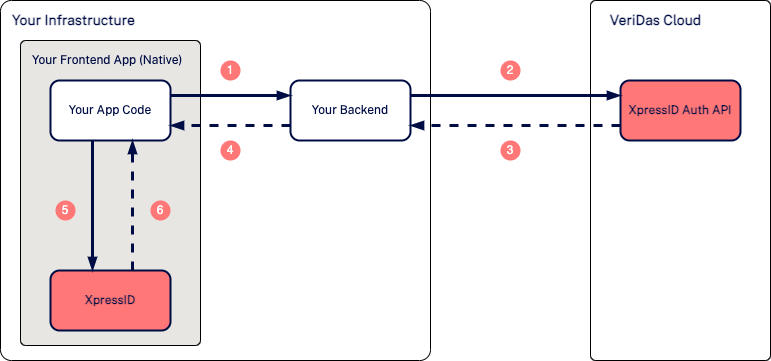
| Interaction | Description |
|---|---|
| 1 | The user logs in within your application. |
| 2 | Your backend requests a token from XpressID Auth API using XpressID_API_URL and API_KEY. |
| 3 | XpressID Auth API returns the token response. |
| 4 | Your backend returns the ACCESS_TOKEN to the app. |
| 5 | The app uses XpressID_URL and ACCESS_TOKEN to launch the native SDK. |
| 6 | The SDK notifies the app when the process completes or when intermediate events are emitted. |
Module integration
Using Zip files
- Create a new Android project (or use an existing one).
-
Import all provided
.aarlibraries into theapp/libsdirectory:The following libraries must be included:
genuine-ds-X.Y.Z.aar platform-common-definitions-X.Y.Z.aar platform-common-image-manipulation-X.Y.Z.aar platform-common-utils-X.Y.Z.aar platform-communication-core-X.Y.Z.aar platform-communication-okhttp-X.Y.Z.aar platform-nativeds-X.Y.Z.aar sdk-core-X.Y.Z.aar sdk-camera-X.Y.Z.aar sdk-document-X.Y.Z.aar sdk-selfie-X.Y.Z.aar sdk-video-X.Y.Z.aar sdk-xpressid-X.Y.Z.aar -
Add the SDK libraries to the app
build.gradledependencies:implementation(files("libs/genuine-ds-X.Y.Z.aar")) implementation(files("libs/platform-common-definitions-X.Y.Z.aar")) implementation(files("libs/platform-common-image-manipulation-X.Y.Z.aar")) implementation(files("libs/platform-common-utils-X.Y.Z.aar")) implementation(files("libs/platform-nativeds-X.Y.Z.aar")) implementation(files("libs/platform-communication-core-X.Y.Z.aar")) implementation(files("libs/platform-communication-okhttp-X.Y.Z.aar")) implementation(files("libs/sdk-core-X.Y.Z.aar")) implementation(files("libs/sdk-camera-X.Y.Z.aar")) implementation(files("libs/sdk-document-X.Y.Z.aar")) implementation(files("libs/sdk-selfie-X.Y.Z.aar")) implementation(files("libs/sdk-video-X.Y.Z.aar")) implementation(files("libs/sdk-xpressid-X.Y.Z.aar")) -
Add the required Jetpack Compose dependencies.
The SDK UI is built using Jetpack Compose. Since local
.aarintegrations do not automatically expose all transitive dependency metadata, the host application must explicitly include the required Compose dependencies:implementation(platform("androidx.compose:compose-bom:<version>")) implementation("androidx.compose.material3:material3") implementation("androidx.activity:activity-compose:<version>") implementation("androidx.lifecycle:lifecycle-runtime-compose:<version>") implementation("androidx.lifecycle:lifecycle-viewmodel-compose:<version>") -
Add the required external dependencies:
implementation("com.google.ai.edge.litert:litert:<version>") implementation("com.google.mediapipe:tasks-vision:<version>") implementation("com.google.android.play:integrity:<version>") implementation("com.squareup.okhttp3:okhttp:<version>") implementation("com.squareup.okhttp3:logging-interceptor:<version>") implementation("io.coil-kt:coil-compose:<version>") implementation("io.coil-kt:coil-gif:<version>") implementation("org.jetbrains.kotlinx:kotlinx-serialization-json:<version>") implementation("org.jetbrains.kotlin:kotlin-reflect:<version>") -
Use tested dependency versions
Dependency Compatible version Compose BOM 2025.06.00 Activity Compose 1.10.1 Lifecycle 2.8.7 LiteRT 1.4.1 Media Pipe 0.10.32 Play Integrity 1.4.0 OkHttp 4.12.0 Coil Compose 2.6.0 Kotlinx Serialization JSON 1.6.3 Kotlin Reflect 1.9.25 Newer versions may work, but compatibility should be validated by the integrator. This is especially important for Jetpack Compose dependencies, where incompatible module versions may lead to runtime errors such as
NoSuchMethodErrororNoClassDefFoundError. -
Sync the project with Gradle and build the application.
android:largeHeap="true"is strongly recommended in the application manifest to improve memory availability during image processing flows.
Prepare the configuration
- Provide a
DocumentCaptureConfigurationinstance (you can build it in code or load it from a JSON). - Ensure camera and record audio permission are defined in
AndroidManifest.xml.
Once the XpressID process completes or an error occurs,
onXpressIDFinished()will be invoked by the SDK.
Configuration payload
The current native SDK uses the API v3 configuration payload. For new integrations, build the onboarding configuration around:
flowSetupsetuptextsmediasstyles
Those sections can be sent inline in the JSON payload or split into separate texts, medias, and styles files when your backend requests the access token with multipart/form-data.
If you are still migrating from an older version, check the migration guides.
Events
The optional onXpressIDEvent(event:) callback receives XpressIDEvent instances on the main thread.
An event has this public shape:
{
    "type": "info",
    "code": "ProcessEvents",
    "message": "Information about events during the process",
    "infoEvent": {
        "code": "DocumentObverseDetection",
        "detail": "The obverse of the document has been captured."
    },
    "eventListened": "VD_capture_obverse",
    "documentIndex": 0,
    "selfieNotCenteredTime": null
}
The relevant fields are:
type:infoorerrorcode: top-level event family. In practice the SDK currently emits:ProcessEventsProcessCancelledProcessCompleted
message: top-level message associated withcodeinfoEvent.code: detailed event code that identifies the concrete lifecycle transitioninfoEvent.detail: human-readable detail for that concrete eventeventListened: raw internal event name received from the underlying stage SDK, when applicabledocumentIndex: zero-based document capture index for document-stage eventsselfieNotCenteredTime: continuous time, in seconds, associated withSelfieFaceNotCentered
Event families
Global and selector events
| type | infoEvent.code | infoEvent.detail |
|---|---|---|
| info | SelectorProcessStarted | Started document selector by country. |
| info | ClickOnDocumentSelector | Clicked any document option of the selector. |
| info | SelectorProcessFinished | Finished document selector by country. |
| info | ACSelectorProcessStarted | Started autoclassification selector. |
| info | ClickOnDocumentACSelector | Clicked one of the optioncs of the acselector. |
| info | ACSelectorProcessFinished | Finished autoclassification selector. |
| info | StartUserProcess | XpressID has been initialized. |
| info | EndUserProcess | XpressID has been finished. |
| info | ProcessCancelled | The process has been canceled. |
| info | ProcessCompleted | The process has been successfully completed. |
Document events
| type | infoEvent.code | infoEvent.detail |
|---|---|---|
| info | DocumentProcessStarted | Document capture process has been started. |
| info | DocumentInstructions | Document instructions shown. |
| info | DocumentMounted | Document capture process has been prepared. |
| info | DocumentUnmounted | Document capture process has been finished. |
| info | DocumentLoaded | Document capture process has been loaded. |
| info | DocumentCameraPermissionsGranted | Camera permissions have been granted in the document process. |
| info | DocumentCameraStarted | The camera has been started in the document process. |
| info | DocumentCameraVideoPlayStarted | The camera is launched correctly on document process. |
| error | DocumentCameraFailureDefaultError | There was a problem starting the camera in the document process. |
| error | DocumentCameraFailurePermissionError | There was a permission problem starting the camera in the document process. |
| info | DocumentSuccessTickFinish | The success tick is fired correctly on document process. |
| info | DocumentReviewImage | Review image has been displayed in the document process. |
| info | DocumentContinueClicked | The user has clicked the continue review image button in the document process. |
| info | DocumentObverseDetection | The obverse of the document has been captured. |
| info | DocumentReverseDetection | The reverse of the document has been captured. |
| info | DocumentProcessFinished | Document capture process has been finished. |
| info | DocumentCloseButtonClicked | The close button has been clicked in the document process. |
| info | DocumentRepeatClicked | The document capture process has been repeated. |
| error | DocumentDetectionTimeout | Timeout has been exceeded. |
| info | DocumentRestartClicked | The user has clicked the restart button in the document process. |
| info | DocumentRestartProcess | The document capture process needs to restart because an error occurred |
| info | DocumentManualCapture | The document has been captured manually. |
| error | DocumentConfigValidationError | The configuration is invalid in the document process. |
| info | DocumentRestartFromModal | DocumentRestartFromModal |
| info | DocumentLoseFocusError | The user has lost the focus on the application. |
Selfie events
| type | infoEvent.code | infoEvent.detail |
|---|---|---|
| info | SelfieProcessStarted | Selfie capture process has been started. |
| info | SelfieInstructions | Selfie instructions shown. |
| info | SelfieMounted | Selfie capture process has been prepared. |
| info | SelfieUnmounted | Selfie capture process has been finished. |
| info | SelfieLoaded | Selfie capture process has been loaded. |
| info | SelfieFlowStarted | Selfie flow started |
| info | SelfieFaceNotCentered | The face is not centered in the selfie process. |
| info | SelfieCameraPermissionsGranted | Camera permissions have been granted in the selfie process. |
| info | SelfieCameraStarted | The camera has been started in the selfie process. |
| info | SelfieCameraVideoPlayStarted | The camera is launched correctly on selfie process. |
| info | SelfieCameraRecorderSetup | The camera has started recording in the selfie process. |
| info | SelfieHeadOkMovement | SelfieHeadOkMovement |
| error | SelfieHeadWrongMovementError | SelfieHeadWrongMovementError |
| error | SelfieHeadMovementTimeoutError | SelfieHeadMovementTimeoutError |
| info | SelfieCameraRecorderStop | There was a problem starting the camera in the selfie process. |
| info | SelfieSuccessTickFinish | The success tick is fired correctly on selfie process |
| info | SelfieFaceDetection | Face has been successfully captured in selfie process. |
| info | SelfieCaptured | Selfie has been successfully captured. |
| info | SelfieHeadCaptured | Selfie head has been successfully captured. |
| info | SelfieProcessFinished | Selfie capture process has been finished. |
| error | SelfieCameraFailureDefaultError | There was a problem starting the camera in the selfie process. |
| error | SelfieCameraFailurePermissionError | There was a permission problem starting the camera in the selfie process. |
| error | SelfieDetectionTimeout | Timeout has been exceeded in selfie process. |
| info | SelfieRepeatClicked | The selfie capture process has been repeated. |
| info | SelfieCloseButtonClicked | Close button has been clicked in the selfie process. |
| info | SelfieRestartClicked | The user has clicked the restart button in the selfie process. |
| info | SelfieRestartProcess | The selfie capture process has been restart because an error occurred. |
| info | SelfieRestartFromModal | SelfieRestartFromModal |
| info | SelfieRestartToken | New challenge is generated during the selfie process |
| error | SelfieCameraRecorderSetupError | An error has been found during the camera setup of the selfie process. |
| info | SelfieContinueClicked | The user has clicked the continue button in image review screen during the selfie process. |
| info | SelfieReviewImage | Review image has been displayed in the selfie process. |
| error | SelfieConfigValidationError | The configuration is invalid in the selfie process. |
| info | SelfieLoseFocusError | The user has lost the focus on the application. |
Video events
| type | infoEvent.code | infoEvent.detail |
|---|---|---|
| info | VideoProcessStarted | Video capture process has been started. |
| info | VideoInstructions | Video instructions shown. |
| info | VideoMounted | Video capture process has been prepared. |
| info | VideoUnmounted | Video capture process has been finished. |
| info | VideoLoaded | Video capture process has been loaded. |
| info | VideoCameraPermissionsGranted | Camera permissions have been granted in the video process. |
| info | VideoCameraStarted | The camera has been started in the video process. |
| info | VideoCameraVideoPlayStarted | The camera is launched correctly on video process. |
| info | VideoCameraRecorderSetup | The camera has started recording in the video process. |
| info | VideoFaceDetection | The face has been captured correctly in the video process. |
| info | VideoObverseDetection | The document obverse has been captured in the video process. |
| info | VideoCameraRecorderStop | The camera has been stopped in the video process. |
| info | VideoReverseDetection | The document reverse has been captured in the video process. |
| info | VideoSuccessTickFinish | The success tick is fired correctly on video process. |
| info | VideoCaptureDetection | Video has been successfully captured. |
| info | VideoProcessFinished | Video capture process has been finished. |
| error | VideoCameraFailureDefaultError | There was a problem starting the camera in the video process. |
| error | VideoCameraFailurePermissionError | There was a permission problem starting the camera in the video process. |
| info | VideoCloseButtonClicked | Close button has been clicked in the video process. |
| info | VideoRestartProcess | The video capture process has been restart because an error occurred. |
| info | VideoRestartFromModal | VideoRestartFromModal |
| info | VideoProcessRestarted | The video capture process has been restarted |
| info | VideoRestartClicked | The user has clicked the restart button in the video process. |
| error | VideoDetectionTimeout | Timeout has been exceeded in video process. |
| info | VideoFaceCenterOrientationError | The face is not centered in the video process. |
| error | VideoConfigValidationError | The configuration is invalid in the video process. |
| info | VideoLoseFocusError | The user has lost the focus on the application. |
Important distinction
XpressIDEventis the non-terminal event stream emitted during the flow.XpressIDError, returned inonXpressIDFinished(error:), is the terminal error object used when the SDK closes because the flow cannot continue.
XpressIDError
When an error occurs, XpressID tries to handle it transparently. However, certain errors cannot be recovered inside the SDK. In those cases the module closes and returns an XpressIDError instance through onXpressIDFinished.
XpressIDError conforms to Codable and can be represented as:
{
    "type": "error",
    "code": "code",
    "message": "message",
    "stage": "stage"
}
This JSON is also accessible through the description instance variable as a String.
The fields are:
typeis always"error"in the current public model.codeis the machine-readable error identifier that your app should use for routing, analytics, or user-facing fallback logic.stagedepends on where the error occurred. It can be one of:"document""selfie""video"
messagecan be either:- a curated SDK default message
- a backend-provided message when the backend returned a more specific detail
Public error codes returned by the SDK
General and backend-related
| code | Default message |
|---|---|
| AvailableTypesError | Available types error. |
| ConfigurationError | A configuration error occurred. |
| TokenNotAllowed | Token has been expired |
| ConnectionError | There has been a problem with the connection |
| ApiTimeoutError | Connection with the api has exceeded the timeout. |
| ValidationError | The provided data is not valid |
| ErrorProcessingRequest | Processing previous request |
| ErrorUpdateValidation | Validation deleted during processing |
| UnknownDocumentTypeError | Document Analysis error: The provided image could not be classified. Please verify that the image and the document type are correct. |
| UnknownAnalysisTypeError | Unknown analysis type |
| InvalidData | Invalid json data |
| ScoresConfigurationNotAllowed | ScoresConfiguration field is just allowed in obverse analysis |
| ScoresConfigurationError | Scores configuration has an incorrect value |
| InvalidScoresConfigurationField | ScoresConfiguration field contains invalid JSON |
| UnallowedLeversError | Document Analysis error: The following levers could not be found please check for errors |
| LogError | An error occurred while sending events to the server. |
| ProcessCompleteError | An error occurred while completing the process. |
| ProcessInformationError | An error occurred while processing the information. |
| StopError | The operation has been stopped by calling stop(). |
| UnknownError | An unknown error occurred: {description}. |
| UserClosedError | User closed XpressID intentionally. |
Document-related
| code | Default message |
|---|---|
| DocumentAnalysisError | {side} document analysis error: the provided image has given an error while analyzing. |
| DocumentTypeError | Error retrieving the document type |
| DocumentTypeMismatchError | The provided document does not match the document type sent |
| EmptyDocumentError | Empty document file |
| InvalidImageType | Invalid image type |
| ImageAlreadyAnalyzedError | The provided image type has already been uploaded and analyzed |
| ErrorProcessingFile | The file couldn't be processed properly |
| DocumentServiceNotReachable | Service url not set |
| DocumentNfcUnavailableError | Document Analysis error: NFC is not available for this document type |
| BlurredImageError | Document Analysis error: The provided image does not meet the minimum quality |
| AdditionalDocumentProcessError | Main document not analyzed |
| DocumentAnalyzingError | Document Analysis error: The provided image has given an error while analyzing |
Selfie-related
| code | Default message |
|---|---|
| SelfieAnalysisError | Selfie analysis error. |
| SelfieChallengeError | Selfie challenge retrieval error. |
| MaxRetriesExceeded | Maximum number of retries exceeded. |
Video-related
| code | Default message |
|---|---|
| VideoAnalysisError | An error occurred while analysing the video. |
Capture-related (document, selfie and video)
These errors are reported when a capture SDK closes with an error. The stage field (document, selfie or video) identifies which capture produced it.
| code | Default message |
|---|---|
| CameraPermissionError | Camera permission was not granted. |
| CameraFailureError | There was a problem starting the camera. |
| CaptureTimeoutError | The capture timeout has been exceeded. |
| CameraRecorderSetupError | An error occurred while setting up the camera recorder. |
| CaptureConfigValidationError | The capture configuration is not valid. |
| CaptureError | The capture finished with an error. |
Resume process
In the idv operation mode, a user may abandon the process or encounter an error before completion. In those cases, the recommended approach is to request a new token using the resume operation mode and the corresponding validation identifier.
Typical scenarios:
- The process was not completed and
ProcessCompletedwas never received. - The user was interrupted by a recoverable document, selfie, or video error.
When requesting recovery:
- if the validation is still active, a new token can be generated and the user can continue from the interruption point
- if the validation has expired or is no longer recoverable, a new onboarding must be started
Integrators should:
- monitor completion events
- track unfinished validations
- handle backend response codes explicitly
- inform the user when recovery is not possible
Example: Module integration
package <Your package>

import android.os.Bundle
import android.util.Log
import androidx.activity.ComponentActivity
import com.veridas.sdk.xpressid.XpressID
import com.veridas.sdk.xpressid.XpressIDError
import com.veridas.sdk.xpressid.entrypoint.XpressIDEventsListener
import com.veridas.sdk.xpressid.entrypoint.XpressIDListener
import com.veridas.sdk.xpressid.event.XpressIDEvent

class XpressIdIntegratorExampleActivity :
    XpressIDListener,
    XpressIDEventsListener,
    ComponentActivity()
{
    companion object {
        private val TAG = XpressIdIntegratorExampleActivity::class.simpleName
        private const val BASE_URL = "Your XpressID_URL"
        private const val TOKEN = "Your Access_Token"
    }

    override fun onCreate(savedInstanceState: Bundle?) {
        super.onCreate(savedInstanceState)

        XpressID.setEventsListener(this)
        XpressID.start(this, this, BASE_URL, TOKEN)
    }

    override fun onXpressIDStarted() {
        Log.i(TAG, "onXpressIDStarted")
    }

    override fun onXpressIDEvent(event: XpressIDEvent) {
        Log.i(TAG, "onXpressIDEvent $event")
    }

    override fun onXpressIDFinished(error: XpressIDError?) {
        Log.i(TAG, "onXpressIDFinished $error")
    }
}