Accessible alternatives
This guide explains how to provide an accessible alternative to biometric verification when integrating XpressID: why it is needed, which events can be used to detect that a user is having difficulty, and how to offer them another way to complete the process.
Accessibility-first approach
At Veridas, accessibility is considered from the very beginning of the product design and development process. XpressID is built following an accessibility-first approach, in which accessibility requirements are incorporated into the Design System, component specifications, interaction patterns and user guidance.
This approach includes:
- Accessible and semantically labeled components.
- Compatibility with assistive technologies.
- Adequate color contrast, text legibility and target sizes.
- Clear instructions and understandable feedback.
- Consistent focus, error, help and progress states.
- Contextual guidance to help users recover from difficulties.
- Events that allow integrators to detect repeated or sustained problems.
- Technical mechanisms for connecting the biometric journey to an alternative verification route.
XpressID has been designed to make the biometric experience as accessible as its nature and security requirements allow.
However, accessibility is not limited to the interface itself. A biometric process may require users to position a document, keep their face within the camera frame, perform a movement or complete an interaction within a given time. These actions may not be possible for every user, regardless of how accessible the interface is.
For this reason, an accessibility-first approach must consider the complete user journey, including what happens when biometric verification cannot be completed.
Providing an accessible alternative
To ensure end-to-end accessibility, the organization integrating XpressID must provide an alternative route for users who cannot complete biometric verification.
Depending on the service and the organization's operating model, this alternative may include:
- Operator-assisted verification.
- An accessible video call.
- Deferred manual verification.
- An alternative electronic identification or signature method.
- Telephone assistance.
- An in-person verification channel.
- Any other equivalent non-biometric procedure.
The alternative must allow the user to achieve the same purpose as the biometric route, such as creating an account, opening a bank account, signing a transaction or accessing a service.
Where European accessibility legislation applies, the complete service must meet the relevant accessibility requirements. Directive (EU) 2019/882, known as the European Accessibility Act (EAA), and its Spanish transposition through Law 11/2023 set accessibility requirements for the services they cover and for the identification methods those services use. Among them is the obligation to provide an alternative when biometric identification or control cannot be used.
Important
Veridas provides an accessible biometric interface and the technical mechanisms needed to detect difficulty and connect the journey to an alternative route. The organization providing the final service is responsible for implementing, operating and validating that alternative.
Recommended accessible flow
Do not wait until the user has definitively failed or abandoned the process to offer an alternative route. Instead, use XpressID events to implement progressive assistance:
- Detect an initial difficulty.
- Provide contextual instructions.
- Identify repeated or sustained difficulty.
- Offer an alternative while still allowing the user to retry, when appropriate.
- Redirect the user when the biometric route is no longer available.
The client application is responsible for listening to the relevant events, applying the desired thresholds and displaying the corresponding assistance or alternative-route screens.
Events for triggering user assistance
XpressID emits events that can help identify when a user may be having difficulty completing a biometric step. These events are received as described in the Receiving events from the SFA section of the integration guide.
An individual event does not necessarily indicate an accessibility need. Events should be interpreted according to their frequency, duration and context. The application should not attempt to infer whether a user has a disability.
The screens shown in this section are illustrative examples. Their content can be customized to reflect the alternatives available in each service.
Capture quality difficulties
These events indicate that the user is experiencing a problem that can usually be solved through contextual guidance.
| Event | Meaning | Recommended response |
|---|---|---|
DocumentGlareModelError |
Glare has been detected on the identity document. | Explain how to reduce reflections and allow the user to retry. |
DocumentGlareModelErrorModal |
Repeated or significant glare has triggered detailed guidance. | Display extended instructions and make help or an alternative route available. |
DocumentBCNModelError |
A document quality problem, such as blur or poor focus, has been detected. | Explain how to improve the capture and allow the user to retry. |
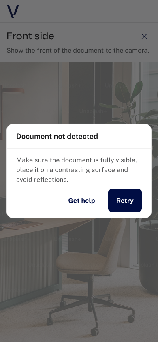
Example screen: contextual assistance
At this stage, the user should normally be allowed to continue with the biometric process.
Selfie positioning and movement difficulties
These events can be used to identify sustained difficulty during a selfie or liveness step.
| Event | Meaning | Recommended response |
|---|---|---|
SelfieFaceNotCentered |
The user's face remains outside the expected area. | Provide clear positioning guidance. If the event persists, offer help or another way to continue. |
SelfieFaceCenterOrientationError |
The user has been unable to position their face correctly within the permitted time. | Explain the problem and provide access to an alternative route. |
VideoFaceCenterOrientationError |
The user has been unable to position their face correctly during the video step. | Explain the problem and provide access to an alternative route. |
SelfieHeadWrongMovementError |
The user has moved their head in a different direction from the one requested. | Repeat or clarify the instruction. Track repeated occurrences. |
SelfieHeadMovementTimeoutError |
The requested head movement was not completed within the permitted time. | Do not require indefinite repetition. Offer another way to continue. |
SelfieHeadOkMovement |
The requested movement has been completed correctly. | Provide document-positioning guidance. Consider offering help if the event persists. |
Example screen: repeated difficulty
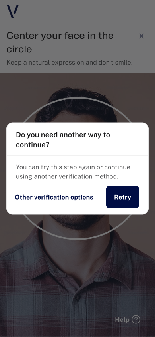
The alternative must be available to every user and must not require them to disclose a disability.
Repeated captures
These events indicate that the user has needed, or chosen, to repeat a capture.
| Event | Meaning | Recommended response |
|---|---|---|
DocumentRetry |
The document capture has been repeated. | Count consecutive repetitions and offer additional help after the configured threshold. |
SelfieFaceCenterOrientationError |
The user has voluntarily selected the option to repeat the document capture. | Treat repeated use as a possible sign of difficulty. |
VideoFaceCenterOrientationError |
The user has been unable to position their face correctly during the video step. | Explain the problem and provide access to an alternative route. |
The appropriate threshold depends on the journey. For example, the application may display an alternative-route prompt after two or three consecutive repetitions.
Example screen: alternative offered before failure
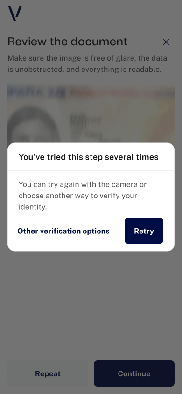
Offering the alternative at this stage prevents the user from having to exhaust all their attempts before receiving support.
Inactivity and interrupted interaction
These events may indicate that the user needs more time, has lost context or has encountered an external barrier.
| Event | Meaning | Recommended response |
|---|---|---|
DocumentDetectionTimeout |
The document step has not been completed within the configured time. | Explain what happened and offer retry, help or an alternative route. |
SelfieDetectionTimeout |
The selfie step has not been completed within the configured time. | Explain what happened and provide accessible next steps. |
VideoDetectionTimeout |
The video step has not been completed within the configured time. | Offer another attempt or an alternative route, depending on the retry policy. |
DocumentLoseFocusError |
The user left the document capture context. | Restore the context when the user returns and display help if appropriate. |
SelfieLoseFocusError |
The user left the selfie capture context. | Restore the context and provide a clear way to resume. |
VideoLoseFocusError |
The user left the video capture context. | Explain whether the recording was interrupted and provide the available next steps. |
A timeout should never leave the user on a blocked screen without an explanation or a way to continue.
Maximum number of attempts reached
These events indicate that the biometric route is no longer available under the configured retry policy. They are described in detail in the Error data section of the integration guide.
| Event | Meaning | Recommended response |
|---|---|---|
MaxRetriesExceeded |
The maximum number of retries for a challenge generation has been exceeded. | Replace the biometric step with the available alternative routes. |
DocumentMaxRetriesExceeded |
The configured retry limit for the document stage has been exceeded. | Replace the biometric step with the available alternative routes. |
VideoMaxRetriesExceeded |
The configured retry limit for the video stage has been exceeded. | Replace the biometric step with the available alternative routes. |
Example screen: biometric route no longer available
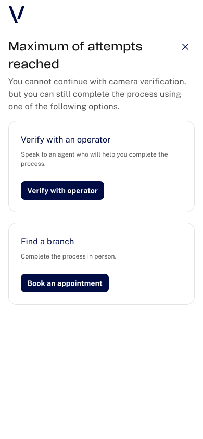
Implementing the alternative route
The alternative route is implemented and operated by the organization integrating XpressID.
The client application should define:
- Which events are monitored.
- How repeated events are counted.
- When contextual help is displayed.
- When an alternative is offered.
- When the biometric route must end.
- Which alternative methods are available.
- Which URL, callback or API action is triggered.
- Whether the user's progress and previously provided information are preserved.
Implementation principles
When implementing the alternative route:
- Do not require users to declare a disability.
- Make the alternative available to all users who need it.
- Use neutral, non-blaming language.
- Explain why the biometric process cannot continue.
- Clearly describe what will happen after an alternative is selected.
- Avoid sending the user back to the beginning unnecessarily.
- Preserve previously provided information whenever possible.
- Ensure that the alternative channel is itself accessible.
- Do not display unavailable or non-operational channels.
- Avoid making the alternative significantly slower or more burdensome than the biometric route.
Responsibility
XpressID provides the events and integration capabilities required to identify difficulty and initiate a fallback. Veridas does not operate the client's alternative verification channels. Therefore, the accessibility of the complete service must be evaluated after integration.
Recommended event-to-interface pattern
The following table summarizes how the client application should respond to each type of signal:
| Signal | Recommended response |
|---|---|
| Initial quality problem | Brief contextual guidance. |
| Repeated quality problem | Detailed guidance with visible access to help or an alternative. |
| Repeated manual captures | Offer an alternative while keeping retry available. |
| Sustained positioning or movement difficulty | Clarify the instruction and offer another way to continue. |
| Loss of focus or inactivity | Restore context and show clear recovery options. |
| Timeout or maximum retries reached | Replace the biometric step with the available alternative routes. |